Building a Weather Station for a Kindle Oasis
An old e-reader is almost the perfect ambient display: quiet, legible, low-power, and already designed to sit still for a long time. I turned mine into a glanceable weather station.
The hardware
The device is a second-generation Kindle Oasis, sold as the Oasis (9th Generation) and identified internally as KOA2. Its serial family begins with G000; I intentionally leave out the rest. It is running Amazon firmware 5.16.2.1.1.
- Kindle
- Oasis 2 / 9th Generation
- Model code
KOA2- Firmware
5.16.2.1.1- App surface
- 1264 × 1464 pixels
The last number mattered more than the physical screen size. A screenshot is 1264 × 1680 pixels, but Kindle’s native top bar owns the first 216 rows. The application only gets the 1264 × 1464 rectangle beneath it. Designing for the whole panel was the reason early layouts felt cramped and misaligned.
The jailbreak
This is the part where the exact model and firmware matter. I used WinterBreak2, whose current documentation covers firmware below 5.16.4. After the jailbreak, I installed Universal Hotfix 2.5.0 and opened its Run Hotfix booklet once so it could finish the setup and restart the Kindle interface.
The useful piece for this project is the Hotfix’s sh_integration. It makes shell scripts placed in the Kindle’s documents folder appear as launchable Library items. That let me ship Weather and Allow Kindle Sleep as ordinary entries without requiring KUAL or MRPI.
A browser from another era
The first version did not look bad. It did not look like anything: selecting Weather produced a white screen, an application error, or an endless Opening state. The Kindle’s built-in Mesquite web runtime is much less forgiving than a current browser.
The working launcher copies the web application from USB storage into Mesquite’s private application directory, registers it in the Kindle application database, and asks appmgrd to start it with a local file:// URL. The shell-integration process also has to remain alive while Weather is open. If it exits immediately, the Library takes focus back and pauses the app it just launched.
I kept the front end deliberately old-fashioned: plain HTML, CSS, and ES5 JavaScript, with no framework, external font, or client-side dependency. Even SVG weather symbols were too optimistic. The old WebKit engine clipped them inconsistently, so I pre-rendered a small monochrome PNG set instead.
Fitting weather onto one page
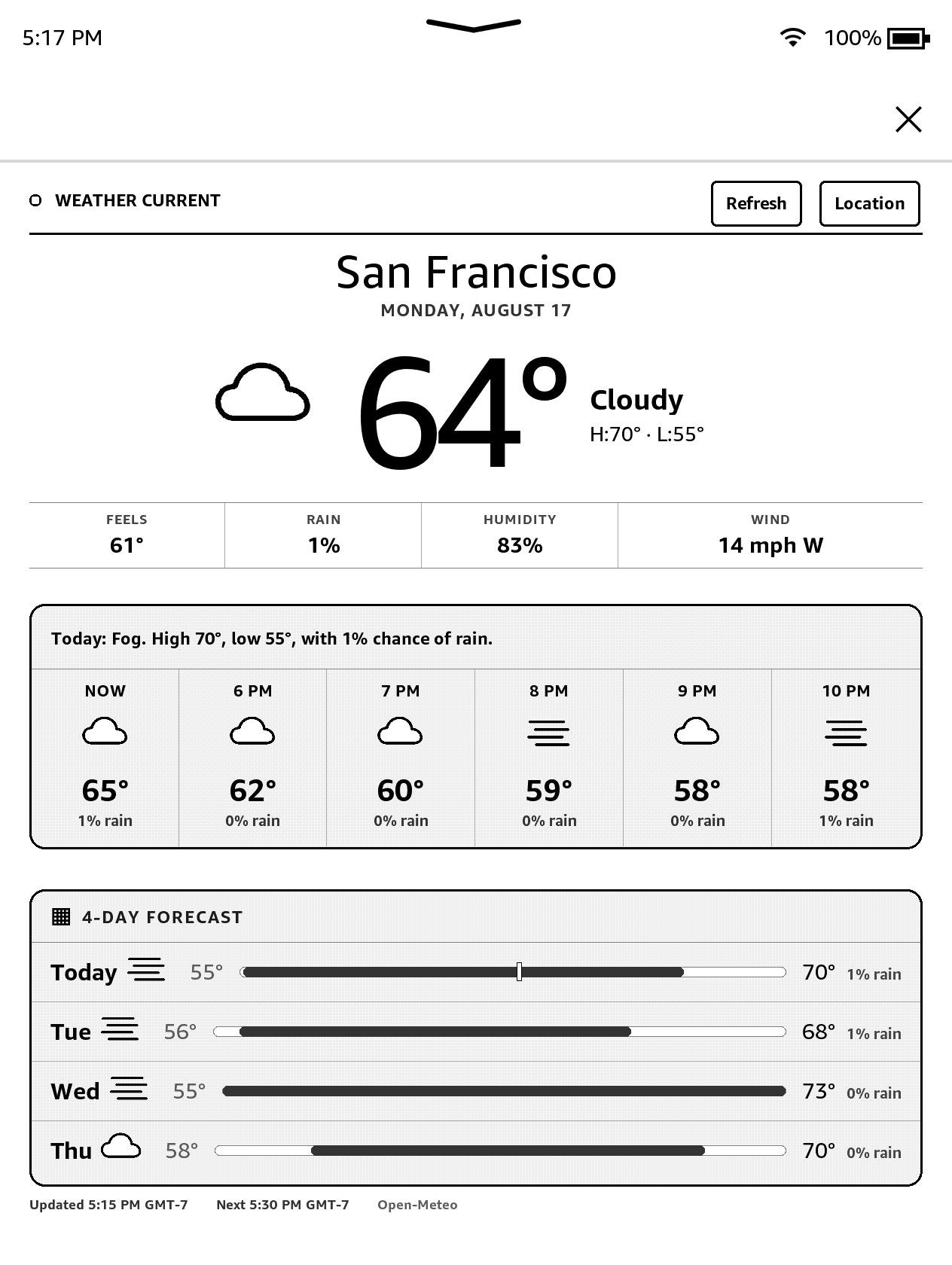
I used the iPhone Weather app as a loose hierarchy, then removed everything that assumes color, animation, or scrolling. The result is a fixed e-ink view: current conditions and a large temperature, four supporting measurements, six hourly slots, and a four-day forecast. Condition symbols carry more of the load because color cannot.
Most of the visual work was spacing. The current reading needed room to breathe above the measurement row; the hourly and daily cards needed separation without pushing the footer below the app surface; and every icon had to remain recognizable after a monochrome refresh. Nothing scrolls, and the native Kindle bar remains untouched.
Weather, caching, and the 15-minute loop
Weather and geocoding come from Open-Meteo. Two small Vercel Functions proxy those requests, while the static dashboard and API are hosted on Vercel. The Kindle refreshes on each 15-minute boundary, stores the chosen location and temperature unit, and falls back to the last successful forecast when the network is unavailable.
To work as an always-on display, the launcher asks the Kindle to prevent its screen saver while Weather is running. That is convenient but not free: Wi-Fi and wakefulness use battery, so I leave it on USB power. A separate Allow Kindle Sleep entry restores the normal power behavior.
One alarming non-bug
At one point the screen filled with raw NativeThreadFreezeDetection logs and a reading progress indicator. It looked like Weather had crashed after several hours. In fact, the Hotfix restart had generated a diagnostic text file, and Kindle had indexed that file as a book. I had opened the log, not the weather app. Removing the generated diagnostic and reopening Weather fixed the mystery.