Shipshape
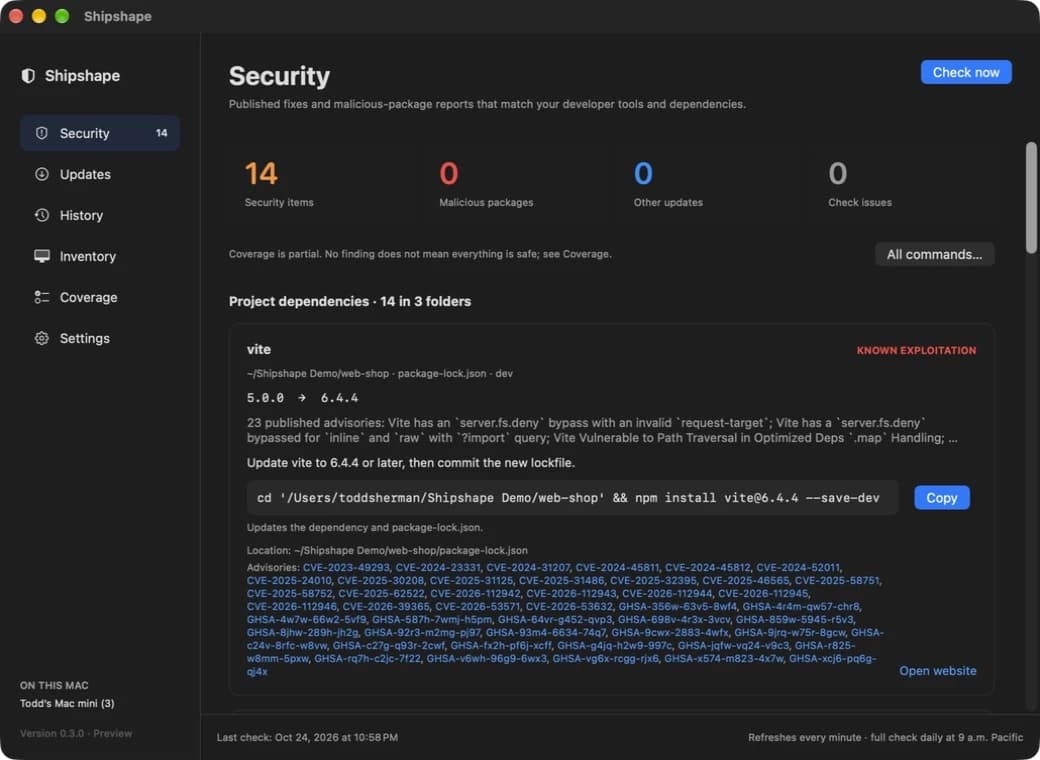
A Mac menu bar app that keeps the tools you build with patched. Building with Claude Code and Codex piles up runtimes, packages and MCP servers fast. Shipshape keeps track of them, tells you which have a published security fix, and gives you the exact command to install it.
Why I built it
Building with AI coding tools means installing a lot, quickly. In a few weeks a Mac collects several Node versions, Python environments, global CLIs, MCP servers, Homebrew libraries and thousands of project dependencies. Agents add packages on your behalf, and most of them never get looked at again.
The security advisories for all of it are public, but they're spread across OSV, NVD, vendor pages and GitHub, and each one assumes you already know what you have and how you installed it. I wanted one quiet app that knows what's on my Mac, checks it against all of those sources, and tells me exactly what to run to fix it.
It follows a few rules. It never changes anything on its own. It needs no account or API key. The inventory stays on the Mac. And it's honest about what it can't see.
What it checks
- Projects
- Lockfiles in the folders you choose: npm, pnpm, Yarn, Bun, uv, Poetry, pip, Cargo, Bundler and Go.
- Packages
- Global npm, Bun and pnpm packages, Python environments, pipx and uv tools, and the npx cache.
- AI tools
- Claude Code, Codex, Gemini CLI, Copilot CLI and OpenCode, plus MCP servers configured for Claude, Codex, Cursor, VS Code and others.
- Runtimes
- Node, Bun, Deno, Python and Go however they were installed, every Homebrew formula and cask, and common developer apps.
Findings come from OSV (including OpenSSF's malicious-package reports), NVD, vendor security pages and GitHub advisories. CISA's catalog of exploited vulnerabilities moves the urgent ones to the top. Google Chrome and Mac App Store apps are left out on purpose, since they update themselves.
Fixing things
Every finding comes with the easiest way to install its fix, chosen for how that software got onto the Mac:
- Homebrew
brew upgrade ffmpeg - Project dependency
cd ~/Projects/shop && npm install lodash@4.17.21 - Python tool
uv tool upgrade llm - Appits own updater, or the vendor’s download page
Findings that share a command collapse into one card, and All commands turns everything into a few lines to paste.
Shipshape never runs those commands itself. It shows them, quoted and checked, for you to read and run. Some issues have no fix released yet. Those wait in their own group, and you get an alert when a fix ships.
Staying current
A full check runs when the app opens and every morning. While the app is open it also refreshes every minute, reusing recent advisory data, so something you just updated drops off the list a minute later.
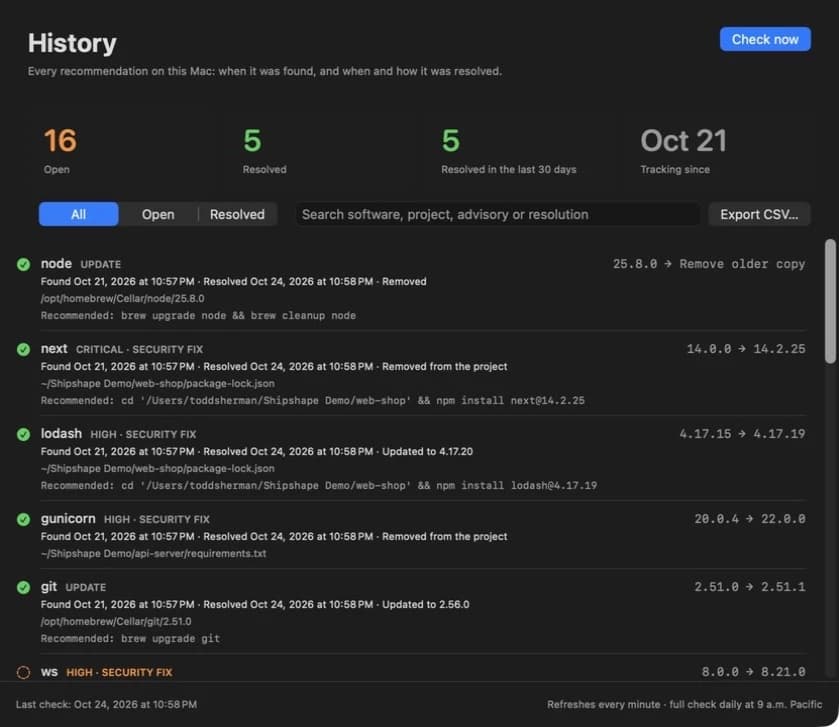
The History tab is a log of every recommendation: when it was found, and when and how it went away, such as "Updated to 4.17.20" or "Removed from the project." It exports as CSV, so you can see what you've done to your Mac.
Privacy and limits
There's no account, no analytics and no cloud inventory. Package names and versions go to OSV, product versions to NVD, and release lookups to Homebrew and vendors. That includes private package names from your lockfiles. MCP settings are read for server commands only, never keys.
Coverage is partial. Editor extensions, containers and software outside its catalog aren't checked, and a check that fails says so instead of reporting software as safe. It's an update monitor, not antivirus.
Help build it
Shipshape is open source under the MIT license. The most useful help is coverage: tools people install that it doesn't know yet, new lockfile formats, better update commands, and reports of findings it gets wrong. The contributing guide explains how to add software to the catalog, and the rules every change follows.